➤ Attendance Overview
For Existing user, Admin Dashboard page will be displayed after Login and for New User need to Setup Company details and Wizard setting First.
There are 6 different block on admin dash board they are as listed below with some summary.
(1) Strength (total number of employee register with that company)
(2) At Work (total number of employee that are working at that particular time)
(3) Birthday (it shows total employee who has birthday on that particular date)
(4) Late In (employee that has arrived late on that particular day)
(5) Early out (employee that has departure early on that particular day)
(6) Device (total number of device register with that account)
For brief detail on each block you can click on them to see its details.
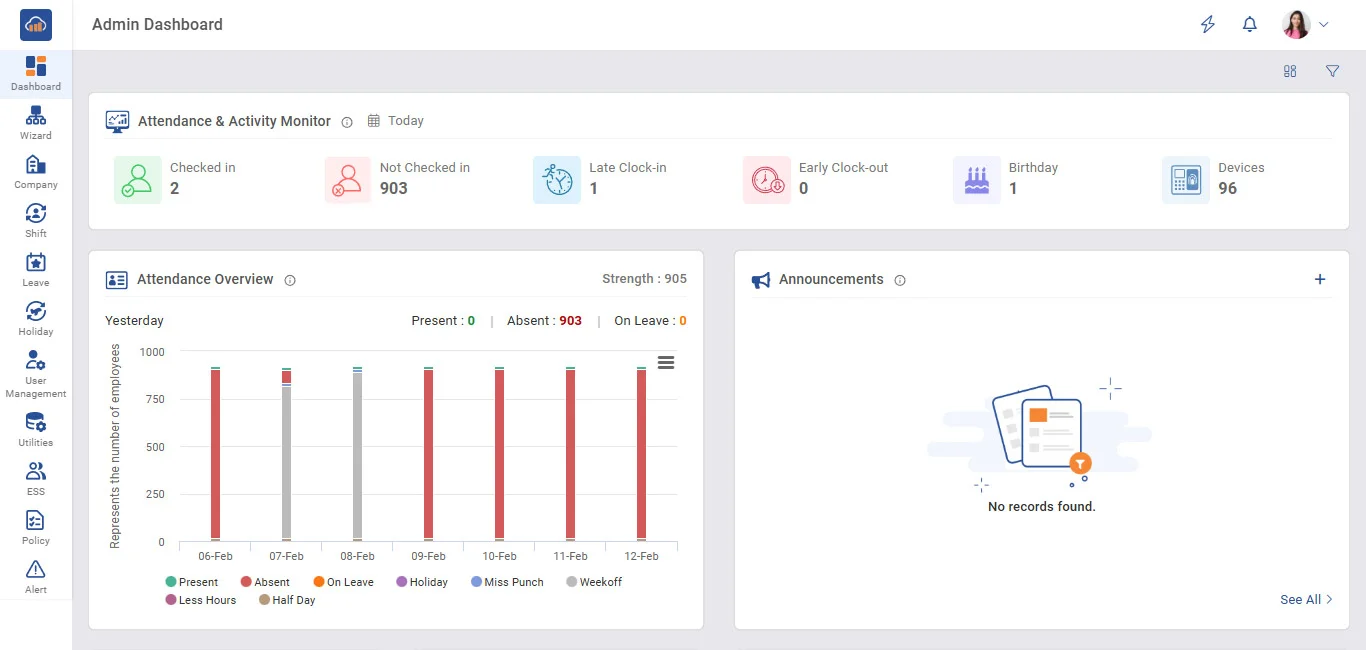
Above image is for admin dashboard general Summary will be show in convenient way that can be analyzed of current company status
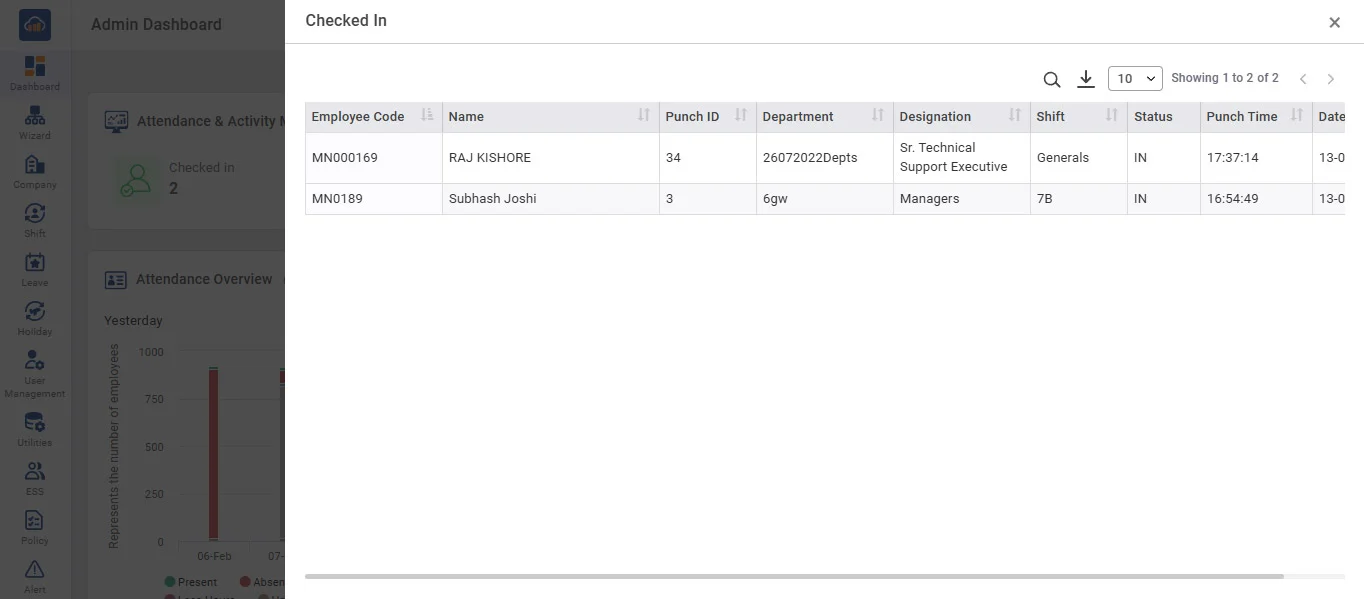
Clicking any block (Checked In, Not Checked In, Late Clock-in, Early Clock-out, Birthday, Devices) opens its detailed view with details. Same simple click-to-view pattern works for all blocks for quick monitoring.
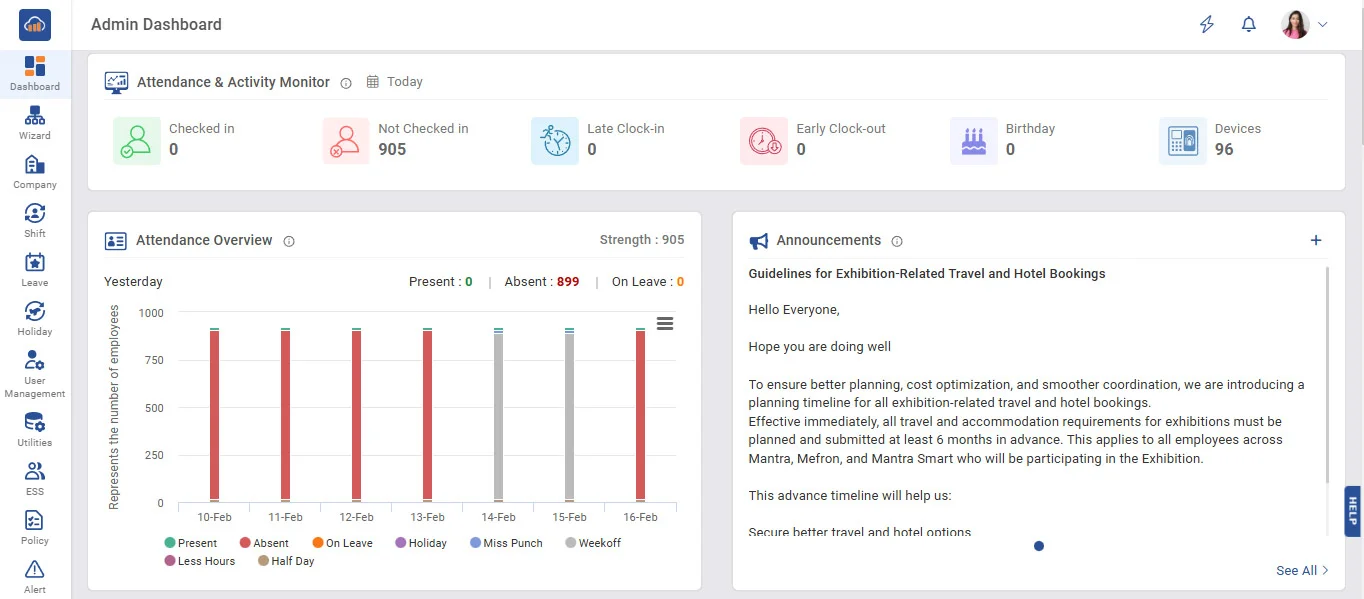
➤ Attendance Overview
View your last 7 days attendance summary.
(1) Present - Employees who successfully completed their scheduled working hours.
(2) Absent - Employees who did not attend work for the day.
(3) On Leave - Employees who were on approved leave.
(4) Holiday - Official company or public holiday.
(5) Miss Punch - Employees with incomplete or missing attendance punches.
(6) Weekoff - Employees on their scheduled weekly off day.
(7) Less Hours - Employees who worked fewer than required working hours.
(8) Half Day - Employees who worked only half of the scheduled workday.
➤ Announcements
Stay updated with the latest company news, policy updates, and important notices.
(1) Latest updates and important information shared by the organization.
(2) Company news, alerts, and official communications in one place.
(3) Important notices and updates you shouldn't miss.
(4) Quick access to recent company announcements and alerts.
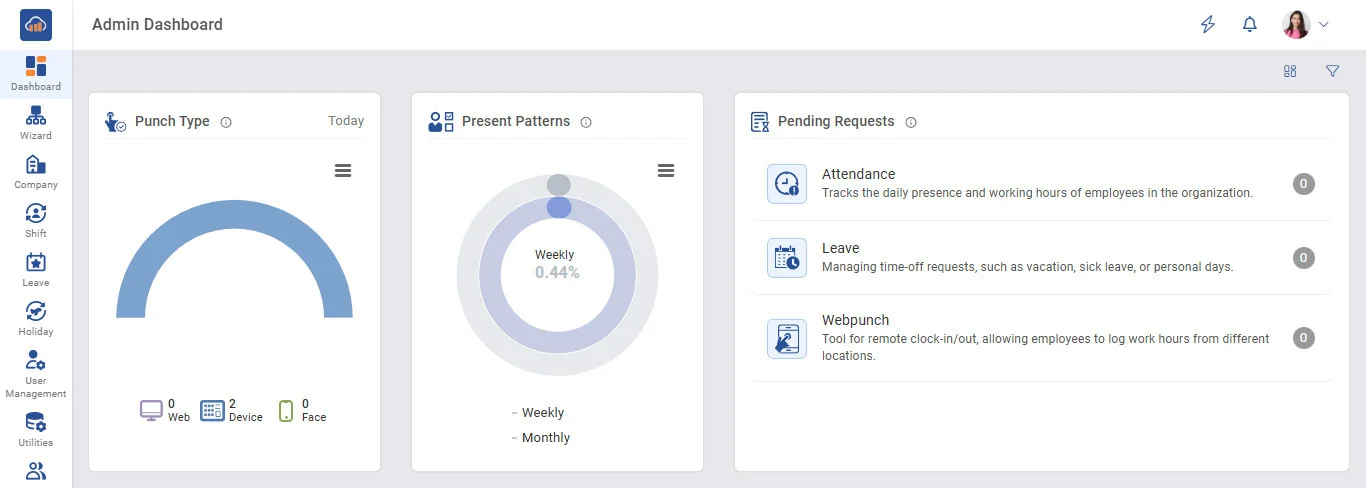
➤ Punch Type
Punch Type refers to the category or mode in which an employee marks their attendance punch (clock-in or clock-out).
• Normal (standard office entry/exit)
• Lunch/Break
• Overtime
• Manual (added by admin)
• WFH / Office / Field / Abroad
These punches can be done via device (biometric machine), web (browser login), or mobile app (ESS app).
➤ Present Patterns
Present Patterns show monthly and weekly attendance trends
• Percentage of days present this month
• Number of present days this week
➤ Pending Requests
Pending Requests are employee-submitted items awaiting approval
• Attendance corrections (missed punches or web punches)
• Leave applications
• Webpunch
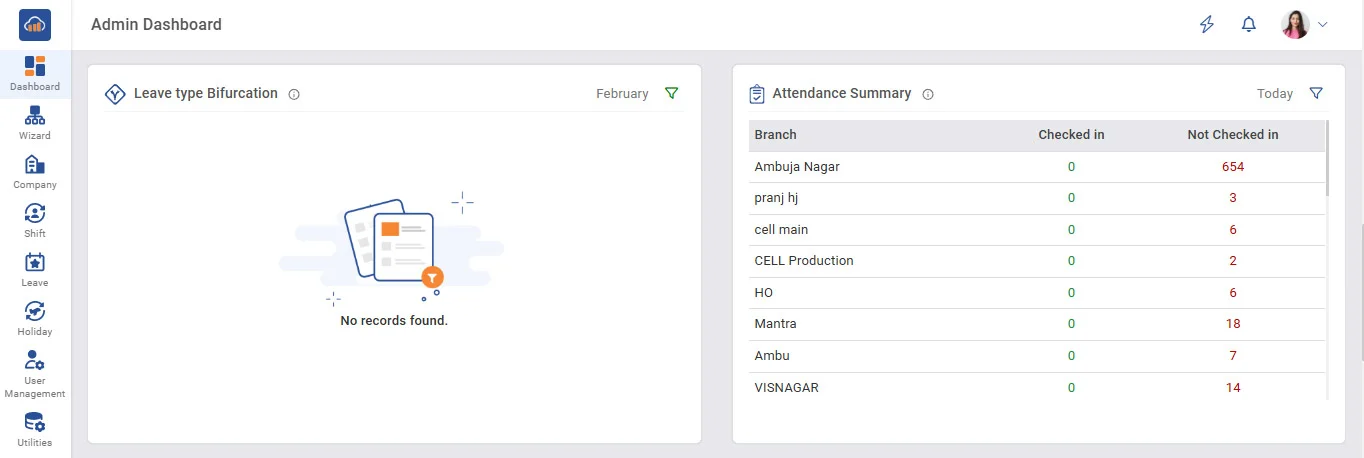
➤ Leave type Bifurcation
Breakdown of leave types used
• View leave distribution by leave type.
• Track how many employees are on each leave category.
• Identify leave trends for the selected month.
• Monitor workforce availability at a glance.
• Helps in planning workload and resource allocation.
• Quickly detect unusual or high leave patterns.
➤ Attendance Summary
Get a quick overview of branch-wise employee check-in and pending attendance for today.
• View attendance status branch-wise and department-wise.
• Track employees who have checked in vs not checked in.
• Get real-time visibility of daily workforce presence.
• Identify branches or departments with low attendance quickly.
• Helps in monitoring punctuality and attendance compliance.
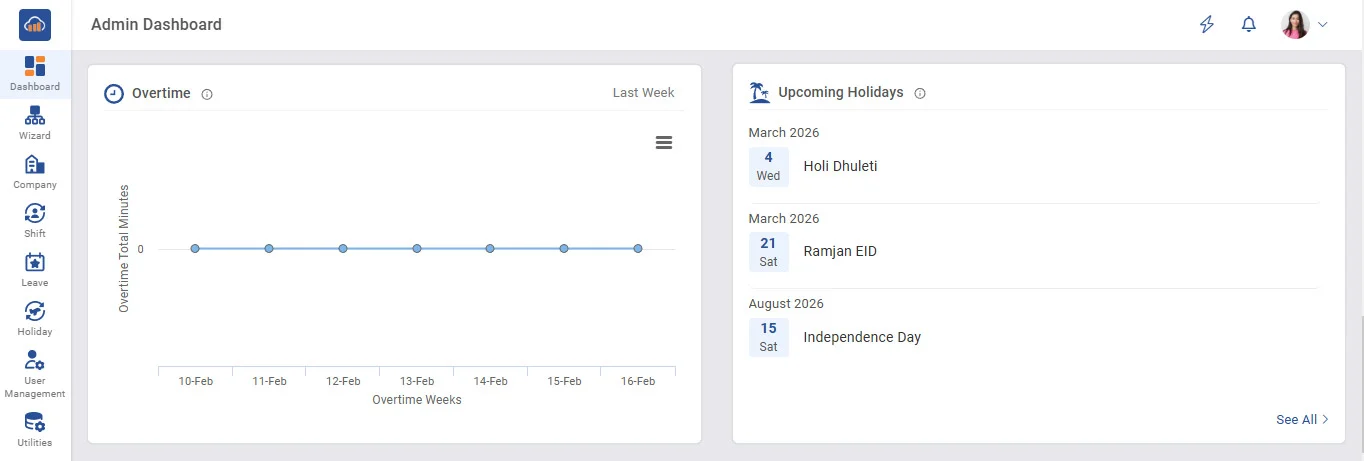
➤ Overtime
Track extra working hours logged by employees beyond regular shifts.
• Monitor employees working beyond scheduled hours.
• Track the number of employees who worked overtime, date by date.
• Ensures compliance with overtime policies.
➤ Upcoming Holidays
Stay informed about upcoming company and public holidays.
• View the list of upcoming holidays in advance.
• Helps teams plan work and leave schedules.
• Supports better workforce and project planning.
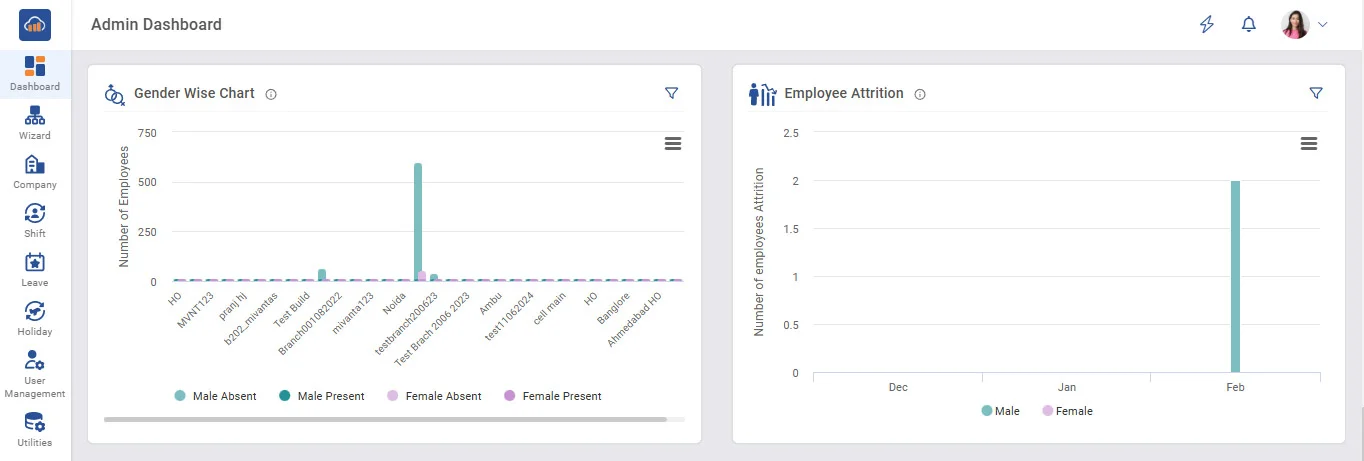
➤ Gender Wise Chart
View employee distribution based on gender across the organization.
• Understand gender distribution at a glance.
• Track workforce diversity and balance.
• Analyze department-wise gender representation.
➤ Employee Attrition
Track employees (Male/Femle) leaving the organization over a selected period.
• Monitor resignation and exit trends.
• Identify departments with high attrition rates.
• Compare monthly or yearly attrition patterns.